SYNAPSE Features
AI-native control for every plugin in your DAW. Bridge mode, Host mode, MCP server, and a complete Creative Engine — in one plugin.
AI Chat — Text to preset
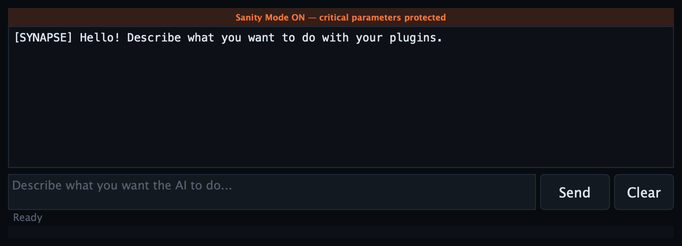
Type what you want. SYNAPSE translates your intent into parameter changes and sends them to the right plugins, in real time.
| Feature | Detail |
|---|---|
| Multi-provider | Claude, OpenAI, Gemini, Mistral, Groq, Ollama |
| Multi-target | One prompt controls multiple plugins simultaneously |
| Structured output | JSON with intention, confidence, targets, params |
| Sanity Mode | AI never applies destructive jumps on critical params |
| Offline | Use Ollama for fully local inference — no API key needed |
Example prompt:
| |
Mode A — Bridge
Control plugins already in your DAW session. SYNAPSE sends parameter changes via 4 parallel channels:
| Channel | Direction | Latency |
|---|---|---|
| DAW Automation | Read/Write | 1 block |
| MIDI CC | Write | < 1 ms |
| MCP | Read/Write | HTTP round-trip |
| OSC | Write | UDP, < 1 ms |
- Target Map — centralized panel to define which plugins receive which parameters
- Per-parameter protection — lock critical params (bypass, mute, output gain)
- Multi-plugin routing — one AI instruction, multiple targets updated simultaneously
Mode B — Host

Load any VST3/AU directly inside SYNAPSE. Full parameter access, snapshots, macros, morphing — the AI controls everything.
| Feature | Detail |
|---|---|
| Plugin browser | Scan + search all installed VST3/AU |
| Fast mode | Skip full state chunk decode for faster recall |
| Show GUI | Open the hosted plugin’s native window |
| Bypass | Bypass the hosted plugin without removing it |
| Full AI access | Every parameter readable and writable by AI |
Creative Engine
Snapshots

12 slots to save and recall complete parameter states. One click to recall. MCP access via save_snapshot / recall_snapshot.
XY Morph Pad

Assign 4 snapshots to corners. Drag the cursor for bilinear interpolation between them. Parameters MORPH_X and MORPH_Y are exposed for DAW automation.
1D Morph Fader
Linear morphing between two snapshots. Exposed as MORPH_1D for automation.
Breeding Engine
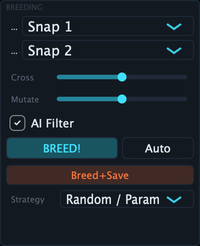
Select two parent snapshots and generate a child by genetic crossover.
| Strategy | Description |
|---|---|
| Uniform | Random selection per parameter |
| Blend | Weighted average between parents |
| Sectional | Per-module crossover (OSC from A, filter from B) |
Macro Controls M1–M8

8 assignable knobs for live control.
- Learn mode — arm a macro, touch a plugin parameter, binding auto-detected
- MIDI CC — each macro responds to an assigned CC
- Bidirectional sync — macro reflects plugin state in real time
- Critical param exclusion — bypass/mute/gain can’t be accidentally bound
MCP Server
SYNAPSE runs a local MCP (Model Context Protocol) server on http://127.0.0.1:52100.
Any MCP client (Claude Desktop, n8n, custom agents) can connect and control SYNAPSE programmatically.
Key tools
| Tool | Description |
|---|---|
get_session_context | Full session state in one call |
get_patch_architecture | Complete topology: OSCs, ENVs, filters, roles |
set_params_batch | Write multiple parameters atomically |
trigger_ai | Send a text prompt to the AI Engine |
save_snapshot / recall_snapshot | Manage snapshots |
set_morph / breed | Morphing and breeding |
set_ai_config / get_ai_config | Configure AI provider headless |
Multi-instance
Multiple SYNAPSE instances auto-discover each other. Route parameters from one instance to another via link_synapse_instance_target.
Audio Brain
Real-time FFT analysis of the hosted plugin’s output.
- Spectral context fed to the AI for informed decisions
- React mode — triggers AI drift on audio transients
- Sample-rate independent — consistent behavior at 44.1k, 48k, 96k
Safety

| Feature | Description |
|---|---|
| Sanity Mode | Default on. Caps per-block parameter delta to prevent clicks and jumps |
| Critical param protection | Bypass, mute, output gain excluded from AI writes |
| Mandatory smoothing | All AI-driven changes are smoothed — no raw value jumps |
| Global Freeze | Lock all parameters. Nothing changes until you unfreeze |
| Recall / Undo | Instant recall of any saved snapshot |
Compatibility
| DAW | Status |
|---|---|
| Logic Pro | VST3 + AU |
| Ableton Live | VST3 |
| Bitwig Studio | VST3 |
| Reaper | VST3 |
| Patchwork (DDMF) | VST3 + AU |
System requirements: macOS 13.0+ (Ventura), multi-core CPU, 8 GB RAM.
Formats: VST3 + AU (instrument and FX variants).