SYNAPSE
The AI plugin for your DAW
Describe your sound. SYNAPSE controls your plugins in real time — via Automation, MIDI CC, OSC, and MCP. Bridge mode or Host mode.
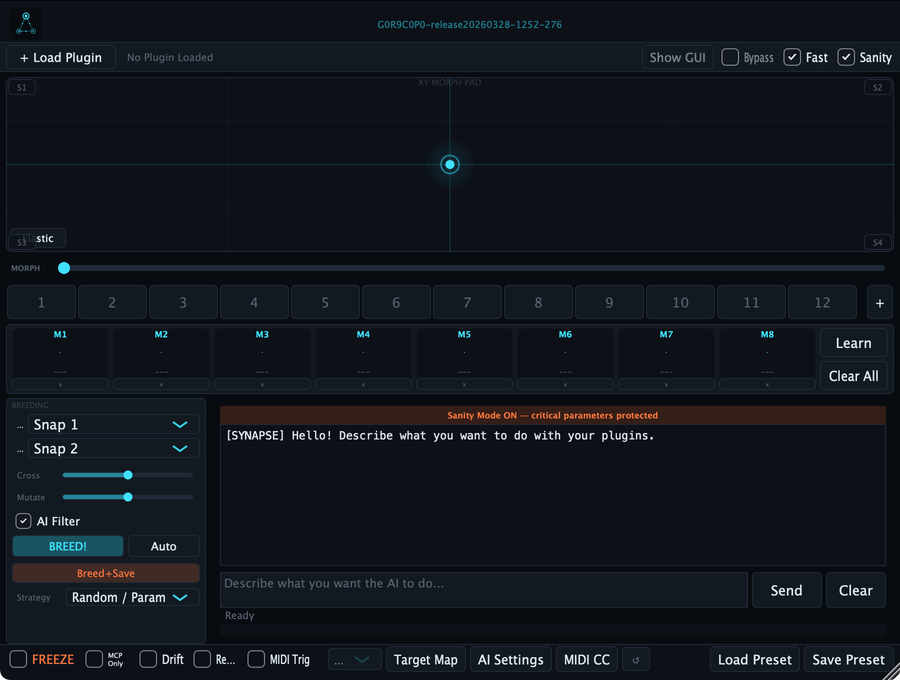
Two modes, one plugin
Bridge the gap between your AI and your DAW — or go all-in and host your instruments directly.
Control your session plugins
SYNAPSE sends parameter changes to any plugin already in your DAW project via Automation, MIDI CC, OSC, or MCP.
- → Multiple target plugins simultaneously
- → DAW Automation + MIDI CC + OSC + MCP
- → Target Map with per-param protection
- → Works with any VST3/AU in your session
Host a plugin inside SYNAPSE
Load any VST3/AU directly inside SYNAPSE. The AI controls it in real time — snapshots, morphing, and macros included.
- → Full parameter access via AI Chat
- → 12 snapshots + 1D/2D morph
- → 8 assignable macro knobs M1–M8
- → Breeding Engine for AI variations
Everything you need to control your sound with AI
From text-to-preset to live morphing, SYNAPSE brings AI-native control to every plugin in your session.
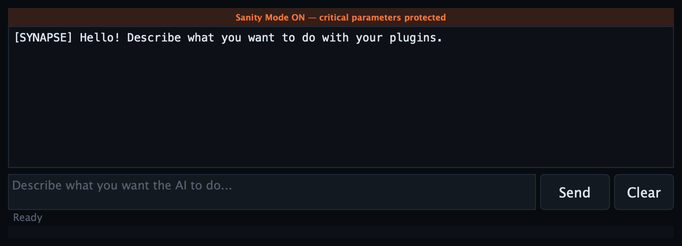
AI Chat — Text to preset, in real time
Type a description. SYNAPSE sends the right parameter values to the right plugins, immediately. No menu diving, no knob hunting.
- Claude / OpenAI / Gemini / Ollama / Groq / Mistral
- Multi-target simultaneous control
- Structured JSON output with confidence scores
- Sanity Mode prevents destructive jumps

Snapshots + XY Morphing + Breeding
Save up to 12 parameter states, morph between them in 1D or 2D, and let the Breeding Engine generate new variations by crossing two snapshots.
- 12 snapshot slots
- 1D fader + 2D XY pad morphing
- Breeding Engine — uniform / blend / sectional
- AI Drift for subtle live variations
8 Macro knobs — assignable to anything
Bind any plugin parameter to M1–M8. Learn mode detects changes automatically. Control macros via MIDI CC for hardware integration.
- Assign any hosted plugin parameter
- MIDI CC input per macro
- Learn mode — touch to bind
- Bidirectional sync with hosted plugin


MCP — Connect Claude Desktop and external agents
SYNAPSE runs a local MCP server on port 52100. Any MCP client — Claude Desktop, n8n, your own agent — can read and write parameters, trigger AI, and manage snapshots.
- JSON-RPC 2.0 over HTTP
- Bearer token auth
- get_patch_architecture — full topology in one call
- SSE push events for real-time sync
Safe by design
Sanity Mode and mandatory smoothing protect your session from destructive AI jumps. Critical parameters — bypass, mute, output gain — are always excluded.
- Sanity Mode — caps per-block parameter delta
- Critical parameter exclusion list
- Global Freeze — lock all parameters
- Recall / undo at any time

Works with your AI provider
Bring your own API key. Switch providers at any time in AI Settings. Prefer local inference? Ollama runs entirely on your machine — no API key, no data leaving your studio.
Local inference with Ollama — no API key required
What producers are saying
Different workflows, same result: more time making music.

Alex Martin
Electronic producer
SYNAPSE changed how I work on sound design sessions. Bridge mode lets me describe what I want in plain English and every plugin in the session responds.
Sofia Laurent
Sound designer
The snapshots + XY morphing + AI Chat combo is now my core workflow. I get clean, reproducible variations in seconds instead of tweaking knobs for hours.
Noah Dupont
Mix engineer
Sanity Mode is the feature I didn't know I needed. The AI never destroys my gain structure or mutes something mid-mix. Full control, zero accidents.
Ready to control your plugins with AI?
Download the free trial or buy a license. No subscription, no vendor lock-in.